Clero Money: Pay Back One Friend Across Several Purchases
Catch up on coffee, tickets, and dinner with one friend. Review each share in Clero, choose requests to pay, and keep purchase details in view.
Your friend covers coffee on Tuesday, buys your concert ticket on Thursday, and pays for dinner on Friday. You remember ticket price. You need to check other amounts before sending money.
Clero Money lets you handle one-on-one request, check your items on shared receipt, and review open requests owed to same person. Use Pay all to review eligible requests together before you authorize payment. You can catch up with friend without rebuilding week’s purchases in chat.
Quick approach: Confirm each amount, remove anything you have paid, and review selected requests before paying. For one agreed amount, direct payment or request may be enough.
In this guide:
- Work through a week of purchases
- Review requests before paying
- Compare payment apps for this use case
- Use a short payback checklist
Use Clero Money for a week of shared purchases
Imagine Maya pays for three purchases that include your share. These figures describe an example, not actual customer spending. Each amount includes agreed charges for that purchase.
| Purchase | Amount Maya paid | Your share | How you agreed on it |
|---|---|---|---|
| Two coffees | $12 | $5 | You ordered $5 drink |
| Two concert tickets | $90 | $45 | Each ticket cost $45 |
| Dinner for three | $96 | $32 | You agreed to equal shares |
| Total | $198 | $82 | $5 + $45 + $32 |
You owe Maya $82. You do not owe half of $198 she spent, because dinner included third person and your coffees cost different amounts. $82 combines your shares of three purchases.
Start with amount you understand. Maya can request $45 for your ticket without creating itemized dinner-style split. For coffee, she can request agreed $5. Both of you should use note that identifies purchase, such as “Tuesday coffee,” rather than a note you will struggle to recognize next week.
For dinner, confirm $32 split before anyone sends request. Equal shares work in this example because all three diners agreed to them. Friend who ordered less can ask group to use item shares instead.
Check each request before you pay
Confirm purchase and your portion
Open request and check who paid, purchase details, and your amount. Receipt helps when you cannot remember whether you shared appetizer or bought your own drink. Ask about charge you do not recognize before authorizing payment.
In Clero, person who paid can scan receipt and assign items, or friends can claim their own items. Review detected items against receipt. For shared dish, confirm who ate it and how you want to divide cost. You can adjust claims and custom shares to match group’s agreement.
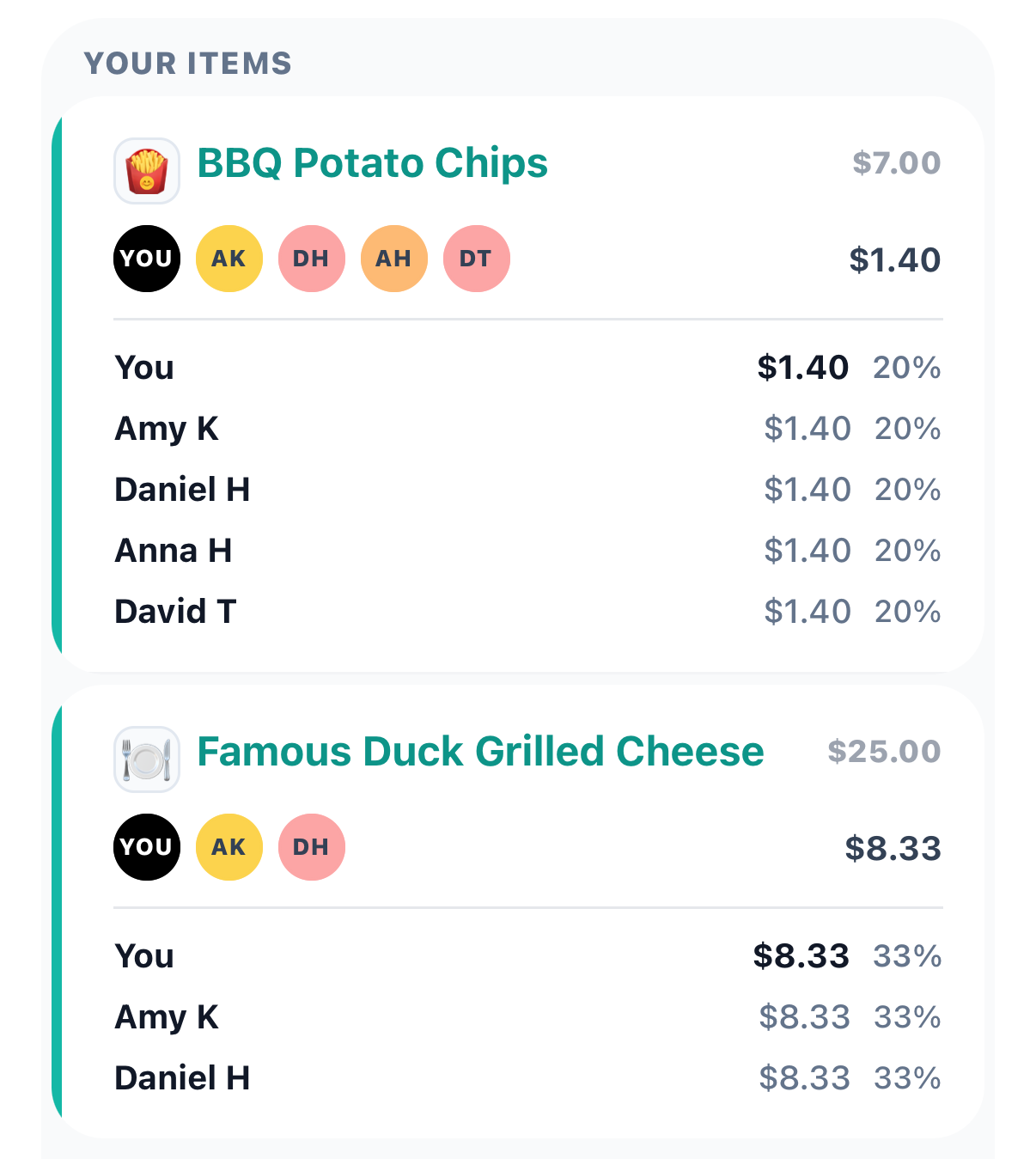
In this Clero screen, friends inspect their portions of shared food before paying.
Check tax, tip, and other charges as part of final amount. Agree on those costs with friends if some people ordered drinks and others did not. Clear item assignment cannot resolve disagreement about who should cover service charge; you need to agree on that choice.
Review requests owed to same person
Clero groups open requests you owe to one person and offers Pay all action. Open review, inspect requests, and choose eligible amounts you intend to pay. Check selected total and payment account before you confirm.
For example above, select $5 coffee request, $45 ticket request, and $32 dinner share to reach $82. If you paid Maya for coffee through another method, resolve that request with her before including it. Sending $82 after separate $5 payment would mean paying for coffee twice.
Treat payment in progress as payment to monitor. Check status before retrying or sending money through another app. Available payment options, account eligibility, and limits can affect what you can submit; reviewing several requests together does not guarantee particular arrival time.
Clero product overview covers direct payments and receipt splits. For purchase with different owners, see shared errands example.
Why not Venmo / Splitwise / Zelle / Cash App for this use case?
1. Where Clero is stronger for this shared-expense workflow
Choose Clero when you want to inspect item shares and catch up on requests owed to one friend in same app. You can start with plain request for ticket, use receipt claims for dinner, and review resulting requests by person. You retain context needed to check each amount before paying.
This workflow helps when “send me $82” leaves you asking which purchases total includes. You can use Clero for everyday one-on-one payments and add receipt detail when purchase needs it. You do not need to treat coffee reimbursement as group accounting project.
This is workflow recommendation, not claim that Clero alone supports expense splitting. Venmo has Groups, and Splitwise offers itemization. Compare steps you and friends need for purchases you share.
2. Where direct-transfer apps or tracking-first apps are better for different jobs
Venmo: Friends may prefer Venmo if they use it for payments and want to stay there. Venmo Groups supports tracking, splitting, and settling shared expenses, including editable split amounts. It can suit group with established process. Venmo’s Groups guide.
Splitwise: Group that wants to maintain ongoing expense record may prefer Splitwise. Pro subscribers can scan receipts and assign itemized expenses to specific people. Consider plan and settlement options that fit group, rather than assuming Splitwise lacks receipt tools. Splitwise Pro features.
Zelle: For agreed $45 ticket payment, you may prefer sending from participating bank’s app. Zelle supports payments to people you know and trust with eligible U.S. bank accounts. Check bank availability and limits. Zelle usage guide.
Cash App: Friends who agree on amount and use Cash App may prefer its send and request flow. You can include payment note to identify purchase. For that job, familiar process may be enough. Cash App payment guide.
Your payback checklist
Before paying several requests to one friend:
- Match each request to purchase and confirm your share.
- Resolve duplicates and payments you made through another method.
- Review selected requests, total, and payment account.
- Confirm payment, then check progress before considering retry.
For message to friend, use: “I have $5 for coffee, $45 for ticket, and $32 for dinner. That’s $82. Does that match your requests?”
Start next shared purchase with Clero. With Clero Money, you can send direct payment for agreed amount or keep receipt, your share, and payment requests together when you need more detail.