Group Splitting for a Volunteer Day: Share Supplies, Meals, and Rides
Use group splitting to sort volunteer-day supplies, meals, and rides before requesting payback. Clero keeps each share and payment status close to the purchase.
Group splitting can keep a volunteer day from turning into a week of “Who owes what?” messages. One person may buy gloves and trash bags, another covers lunch, and a third drives the team across town. The costs belong to different people, even though the group shared one day.
Clero gives friends, roommates, and community teams a way to attach each cost to the people who used it, request the right amount, and check payment status afterward. Use a direct payment when two people agree on a single amount. Use group splitting when supplies, food, rides, or mixed shares need a record first.
Quick answer: List each purchase while the details are fresh, assign personal and shared costs separately, then send requests after each person can review their share. Keep the receipt or transaction context near the request so the payer does not need to reconstruct the day in chat.
Contents
- Start group splitting with a simple cost map
- Work through a volunteer-day example
- Turn receipts into reviewed requests
- Why not Venmo / Splitwise / Zelle / Cash App for this use case?
- Volunteer-day checklist
- FAQ
Start group splitting with a simple cost map
Start with the job each purchase served. A $31.20 box of gloves used by six volunteers belongs in a shared split. A $14.75 coffee for one person does not. A $24 parking charge may belong to the carpool riders, while a $38 lunch receipt may need item-level assignments.
Write those distinctions down before anyone sends money. Give the group enough context to recognize a request and decide whether the share is fair.
For each purchase, answer three questions:
- Who paid?
- Who used the item, meal, or ride?
- Should those people split it equally or by a custom share?
Clero supports organizer assignments, participant claims, and custom shares. An organizer can assign obvious costs, leave a shared item open for volunteers to claim, or combine both methods. That flexibility matters when one person buys supplies in advance and the rest of the group decides lunch after the event.
Work through a volunteer-day example
Six neighbors spend a Saturday cleaning a community garden. Jules pays $31.20 for gloves and bags. Morgan pays $38.40 for lunch. Priya pays $24 for parking and fuel. The group agrees that all six volunteers share the supplies, only four people ate lunch, and three riders share the car cost.
| Purchase | Total | People sharing | Per-person share |
|---|---|---|---|
| Gloves and bags | $31.20 | 6 volunteers | $5.20 |
| Lunch | $38.40 | 4 lunch guests | $9.60 |
| Parking and fuel | $24.00 | 3 carpool riders | $8.00 |
These amounts give each person a reason for each request. A lunch guest who drove separately owes $14.80: $5.20 for supplies plus $9.60 for lunch. A carpool rider who brought food from home owes $13.20: $5.20 for supplies plus $8 for the ride. The group does not need one equal split because their use was not equal.
Check the actual receipt before sending requests. Include sales tax, discounts, tip, or a corrected item price when they apply. Clero’s receipt flow can detect items for review, and groups can use the receipt image, PDF, Gmail receipt context, or transaction details as a starting point. The person who paid should confirm the final total against the source purchase.
Turn receipts into reviewed requests
Add each purchase while the details are visible
Scan or share a receipt, add a PDF, or use available transaction context such as merchant, amount, and date. Name the expense so the group recognizes it later: “Garden cleanup supplies” says more than a merchant name alone.
Assign costs, then leave uncertain items open
Assign the glove-and-bag cost across the six volunteers. Assign lunch items to the four people who ate. For a disputed or unclear item, leave it open for the right people to claim. Clero can keep the item choices and payment request in one shared-expense flow, so a participant can see the purchase behind the amount.
Request payment after the numbers make sense
Send requests after the group reviews the shares. A participant with a clear $14.80 share can pay without waiting for a different pair of riders to resolve their fuel split. Clero shows paid and pending progress beside the expense, which helps the person who covered the cost follow up from a record rather than memory.
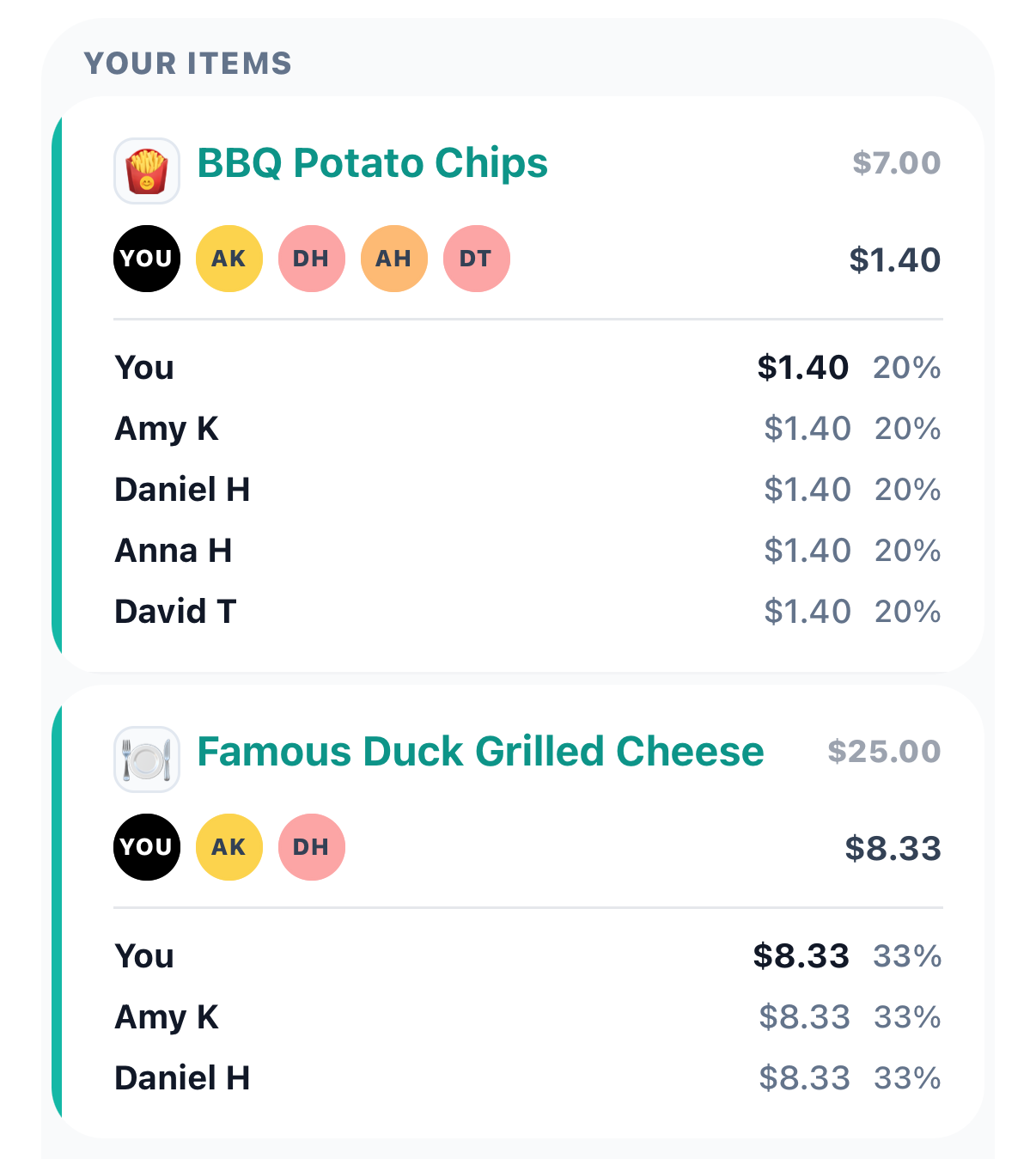
A Clero item breakdown can show each participant’s dollar amount and percentage for a shared item.
For a one-on-one favor, keep the workflow simple. If Morgan also buys Jules a $6 snack and both agree on the amount, a direct request is enough. Save itemized group splitting for the purchases that need explanation.
Why not Venmo / Splitwise / Zelle / Cash App for this use case?
Where Clero is stronger for shared-expense workflow
Clero fits a purchase-to-payback workflow. The group can start from a receipt or purchase context, assign items or invite participants to claim them, set custom shares, send requests, and check payment status in the same place. That sequence helps when the volunteer team used different combinations of supplies, meals, and rides.
It also supports a mixed-control approach. Jules can assign shared cleanup supplies, then let carpool riders settle the parking split. Each person can act on a confirmed share while the group finishes other claims. Explore Clero’s shared-spending flow or use Find My Clero to reopen an active request.
Where direct-transfer or tracking-first apps fit different jobs
Venmo lets users split a purchase, adjust request amounts, add tips or surcharges, and review pending requests. It fits a group that already knows the amounts and wants to request repayment in Venmo.
Zelle is available through participating banks and credit unions. Eligible enrolled consumer transfers typically occur in minutes, according to Zelle, but availability depends on the financial institution and eligible accounts. Use it for a known amount between people who know and trust each other.
Cash App supports payments and requests through a $cashtag, phone number, email, or payment link. That can suit a simple contribution when the group needs a quick link and no item-level review.
Splitwise keeps group expenses and balances visible to group members. It fits households or teams that prefer a running ledger across many expenses. Clero is stronger when the group wants to work one purchase through clear shares and visible payment completion.
Volunteer-day checklist
Use this before the team leaves the site:
- Save receipts for supplies, food, and transportation.
- Separate personal purchases from group purchases.
- Add the payer to every shared-cost calculation.
- Check custom shares, discounts, tax, and tips against the receipt.
- Send requests only after each participant can recognize the charge.
- Review paid and pending status before sending reminders.
This list also works for a school drive, trail cleanup, neighborhood meal train, or team fundraiser. Match the detail to the purchase. A $5 agreed snack does not need a six-person split. A mixed receipt with supplies and meals does.
FAQ
Can one volunteer pay before the rest of the group finishes?
Yes. A participant can pay a confirmed share while other people finish open claims. Check their items and any shared-cost allocation before they pay, then use the expense’s payment status to see what remains.
Should the organizer split everything equally?
No. Equal shares work only when the same people used the same purchase. Assign individual meals to the people who ate them, divide shared supplies among their users, and use a custom share when the group agrees on a different allocation.
Is group splitting only useful for large events?
No. Two or three people can use group splitting when one receipt has different shares. A direct payment still makes more sense when two people know one amount and do not need receipt context.
Use group splitting to close the volunteer-day loop
Group splitting gives a volunteer team a record of shared costs before reimbursement starts. Save the purchase, confirm each share, and track payments until the costs close out. Explore Clero before next shared errand turns into a group-chat calculation.